





Summary
- noCRM centralizes the entire sales workflow, from lead capture and qualification to invoicing and post-sales management.
- Sales teams can create leads quickly, qualify prospects efficiently, automate follow-ups, and manage every interaction from a single platform.
- Built-in quoting, invoicing, deposit invoices, credit notes, and post-sales tasks help streamline operations and save time.
A successful sales workflow should streamline each phase—from capturing leads to closing deals and managing post-sales tasks—so sales reps can focus on building relationships and driving revenue. noCRM is designed with this in mind, offering a simplified sales process by centralizing each step in one platform. Here’s how noCRM guides you through each stage of the sales workflow, providing tools like click-to-call, VoIP integration, automated reminders, and built-in invoicing to keep your sales process efficient and organized.
Capture Leads Effortlessly with noCRM
The first step in any sales workflow is capturing and creating leads, and noCRM offers a variety of methods to make lead capture quick and organized:
- Convert prospects into leads directly from prospecting lists with one click. This lets sales teams move efficiently from cold prospects to actionable leads.
- Manually create leads from either the web or mobile app by filling in essential information.
- Use the Lead Clipper tool to capture leads directly from web sources like LinkedIn. This tool lets you add a button to your browser, and when clicked, it auto-fills lead details into noCRM, eliminating manual entry.
- Automate lead creation using no-code workflows. For instance, you can set up automations that generate leads from website forms, so noCRM captures new leads instantly.
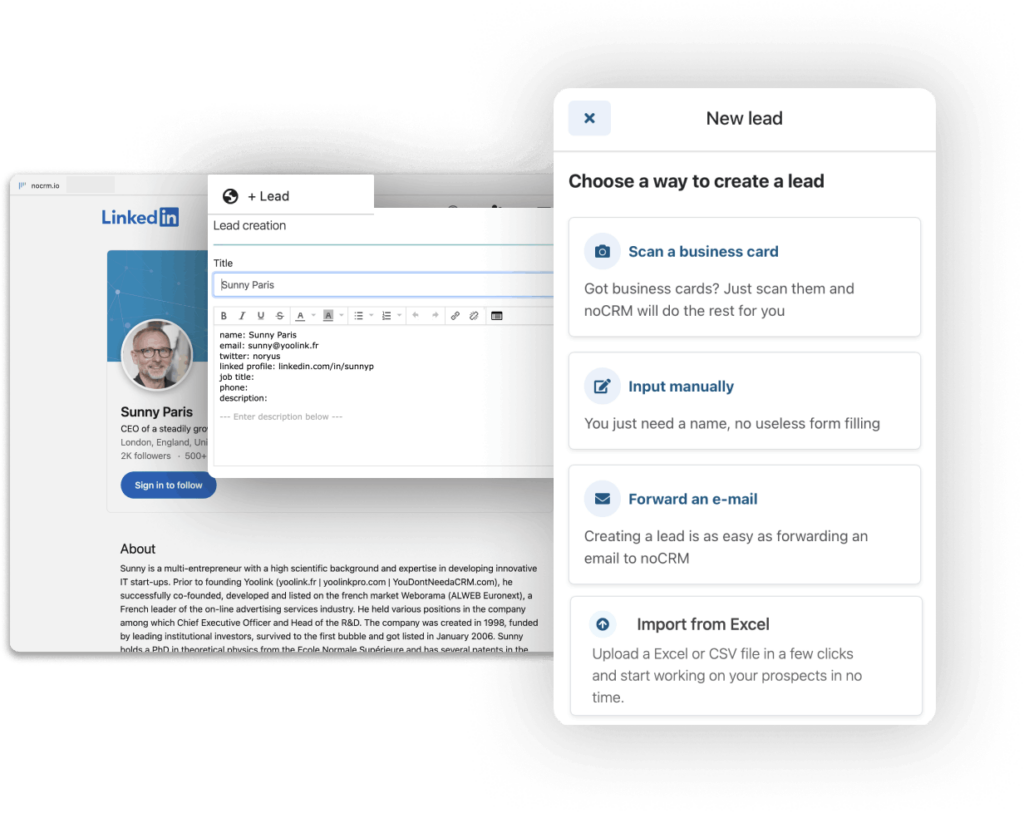
These options give you an efficient start to the simplified sales process noCRM is known for, ensuring that every potential lead is organized and ready for follow-up.
Qualify Leads for a Focused Sales Workflow
Separating prospects from qualified leads is essential for an efficient sales workflow. Prospects are cold contacts who may or may not convert, while qualified leads have shown genuine interest. noCRM provides specific tools to streamline this process:
- Dedicated prospecting lists allow sales teams to manage cold prospects in spreadsheet-style views, making it easy to add details, sort contacts, and convert them to leads once they’re qualified.

- Pipeline views for qualified leads, which provide a clear visual of leads at each stage of the sales journey, enabling sales reps to focus on the most promising opportunities.

A key method for qualifying leads is cold calling, and noCRM’s click-to-call functionality and VoIP integrations make this easier than ever. Reps can call prospects directly from the prospect list with a single click, which is perfect for high-volume outreach. Calls are automatically logged, saving time on data entry and ensuring every call’s outcome is recorded.
To further assist in qualification, noCRM includes a Sales Script Generator. Reps can create and use customized scripts directly within noCRM, ensuring that no important qualification questions are missed. Once a prospect is qualified, it only takes one click to convert them into a lead, moving them smoothly through the sales workflow.
Stay Organized with Streamlined Lead Management and Follow-Up
With qualified leads in hand, noCRM provides structured tools to keep follow-ups organized and efficient:
- Mandatory next actions and reminders ensure that every lead has an assigned follow-up, whether a call, email, or meeting, ensuring no opportunities are missed. Reminders automatically appear in a “to-do” list, so reps know exactly what to do each day.
- To-do reminders and status notifications keep sales reps on track with all necessary actions, minimizing the risk of missed follow-ups.
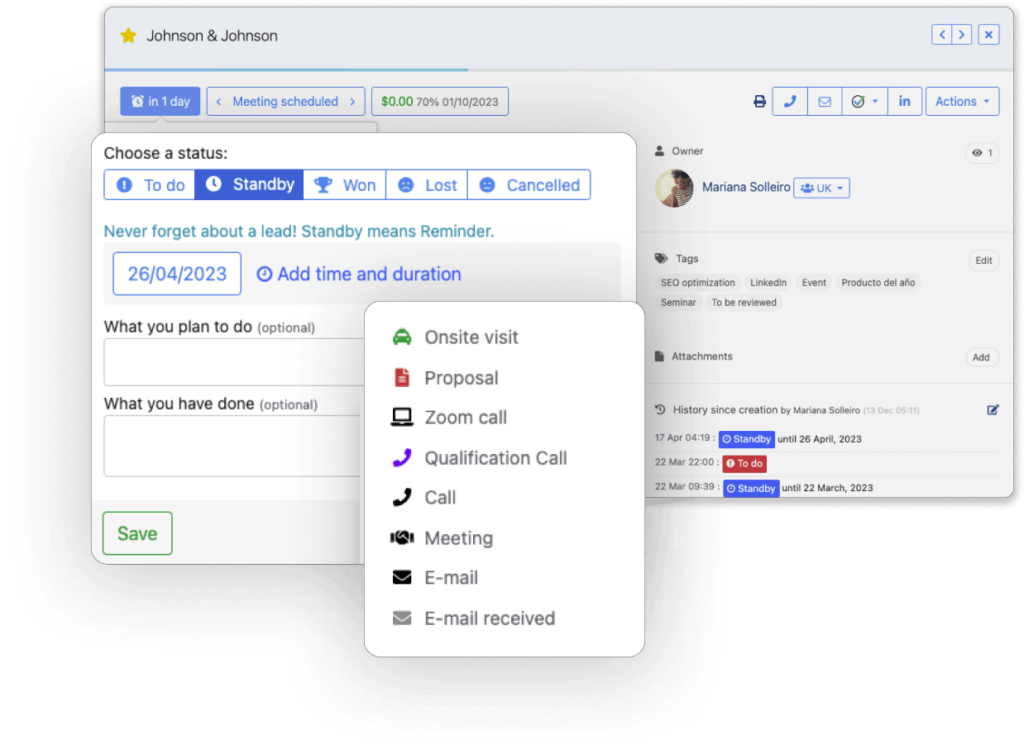
- Integrated email and call tracking logs every interaction on the lead’s profile. Reps can send emails using templates (with personalized variables) or initiate calls through click-to-call or VoIP, with each communication automatically logged in for easy tracking.
noCRM also simplifies lead progression with drag-and-drop functionality for moving leads through the pipeline, contributing to a simplified sales process that keeps the entire team organized and aligned.
Simplify the Closing Stage with Quotes and Invoices
In the closing stage, a smooth transition from quote to invoice is essential, and noCRM’s built-in system makes this process seamless. Sales reps can:
- Generate quotes and invoices from within a lead’s card. Once a lead reaches the closing stage, reps can create a branded, professional quote or invoice in just a few clicks, without needing an external tool.
- Create deposit invoices to secure partial payments upfront, reducing the risk of non-payment and ensuring a client commitment.
- Issue credit notes to make adjustments if an invoice needs corrections or partial refunds. Credit notes allow for easy, transparent adjustments without manual recalculations.

With these invoicing options, noCRM offers a simplified sales process that supports both standard and complex invoicing needs. When a deal is won, it can be marked as “won” and added to a client folder for easy post-sales management, keeping the client’s information organized and accessible.
Manage Post-Sales Tasks Effortlessly
After a sale closes, maintaining a positive client relationship is key. noCRM supports the post-sales process with post-sales process templates. These templates act as pre-set to-do lists, guiding teams through all necessary follow-up tasks after a deal is won. This way, sales teams can deliver consistent, organized post-sales support without needing to create tasks manually each time.
With a clear post-sales task list for each closed deal, teams can easily track follow-ups, ensuring that no client is left without the support they need.
The Benefits of a Centralized Sales Workflow with noCRM
Using noCRM for the entire sales workflow offers significant benefits for sales teams:
- Time savings by eliminating the need to switch between multiple tools, keeping the focus on selling.
- Streamlined processes with centralized data access, so there’s no need to manually transfer information between tools.
- Enhanced team alignment with all sales resources consolidated in one platform, providing a unified view of leads, clients, and sales actions.
noCRM’s philosophy is simple: streamline each stage of the sales workflow so sales reps can focus on selling. By offering a simplified sales process with powerful tools for every step, noCRM keeps teams motivated, organized, and free to build relationships and close deals.
FAQ
Q: How does noCRM simplify the sales workflow?
A: noCRM centralizes each step, from lead capture to invoicing, in one platform, saving time and eliminating the need to switch tools.
Q: How does noCRM help with lead qualification?
A: noCRM allows you to separate cold prospects from qualified leads using prospecting lists, pipelines, and tools like click-to-call and the Sales Script Generator.
Q: What invoicing options does noCRM offer?
A: noCRM includes quotes, standard and deposit invoices, and credit notes, allowing for easy invoicing directly from the sales platform.
Simplify your sales process from lead to invoice