
Choosing between noCRM vs Pipedrive can significantly impact your sales team’s productivity and results. This guide is for sales managers, business owners, and sales professionals who are evaluating CRM solutions and want to choose a tool that truly supports how their team sells. Both platforms are popular choices in the CRM software market and serve businesses of all sizes, but they take fundamentally different approaches to customer relationship management. Picking the wrong one can lead to wasted time, frustrating workflows, and missed opportunities.
In this comparison, we’ll evaluate features, pricing, ease of use, integrations, and suitability for different sales team needs. We’ll explore how Pipedrive focuses on customizable sales pipelines, AI-driven insights, and reporting, while noCRM emphasizes eliminating distractions, streamlining lead management, lead capture, and collaboration. Both platforms allow users to tailor workflows and integrations to specific business needs, but they reflect two distinct CRM philosophies.
This comparison will help you decide which approach aligns best with your sales process and team structure. One prioritizes speed and action. The other prioritizes oversight and reporting. Neither is wrong—but one is probably right for you. Understanding these core differences upfront can save you cost, time, and implementation headaches down the road. Let’s break it down.
What You’ll Find in This Article:
- A detailed comparison of noCRM vs Pipedrive, highlighting their distinct CRM philosophies and approaches.
- Insights into setup complexity, user interface, and daily workflow differences between the two platforms.
- An overview of integration philosophies and how each CRM connects with existing business tools.
- Considerations for sales team fit, adoption, workflow impact, and security.
- Pricing models and total cost of ownership analysis for both noCRM and Pipedrive.
- User sentiment and real-world feedback from sales professionals using each platform.
What Makes These CRM Platforms Unique?
At a high level, noCRM and Pipedrive are built around very different priorities.
noCRM is designed to keep salespeople focused on the “Next Action” for every lead. Its core philosophy is to reduce distractions and help reps move deals forward with clarity and speed. To support this, the platform offers lead capture from multiple sources, ensuring that incoming leads are quickly actionable rather than buried in complex records.
Pipedrive, by contrast, is recognized for its robust feature set that empowers sales teams to track leads systematically and close deals efficiently. It emphasizes structured pipelines, detailed visibility into deal progress, and tools that support forecasting, reporting, and performance tracking across the entire sales process.
noCRM – “The Anti-CRM” Approach
noCRM explicitly brands itself as “The Anti-CRM.” The philosophy is simple: strip away traditional CRM complexity so salespeople can focus on what actually matters: selling.
Here’s what defines the noCRM approach:
- Designed specifically for salespeople who prioritize speed and prospecting over complex reporting
- Built around removing friction from daily sales activities with streamlined lead management focuse
- Features Lead Clipper and Prospecting Lists for outbound-heavy sales teams
- Different pricing models for each need, with no hidden add-ons and costs
In addition, noCRM is designed with simplicity in mind, offering a streamlined approach to managing leads and sales.
The platform serves over 11,000 salespeople globally, with a proactive sales bent that emphasizes converting raw leads into customers quickly. Users consistently describe it as “extremely user friendly, very clean layout” with immediate effectiveness for tracking.
Pipedrive – Traditional Pipeline Management
Pipedrive takes a more comprehensive approach to customer relationship management. It’s built for visibility, control, and detailed performance tracking.
Key characteristics of Pipedrive include:
- Comprehensive CRM features with extensive customization options
- Built for complex sales processes with multiple stakeholders and approval stages
- Tiered pricing structure with advanced features in higher plans
- Focus on deal management and sales performance tracking
Pipedrive scores particularly well for medium-sized and enterprise suitability (9.2/10 on TrustRadius), reflecting its scalability for managerial layers and team oversight requirements.
noCRM vs Pipedrive: Feature Comparison
Setup Complexity and Time Investment
One of the most significant differences between these platforms lies in how quickly you can start using them effectively.
| Pipedrive | noCRM | |
|---|---|---|
| Setup Time | Weeks (configuration, custom fields, workflows) | Minutes (plug-and-play design) |
| Admin Setup | Complex permissions, role hierarchies | Minimal (get started immediately) |
| Training Required | Significant for full functionality | Basic orientation sufficient |
| Ongoing Maintenance | Regular pipeline cleanup needed | Lightweight upkeep |
noCRM’s philosophy intentionally removes elements that slow down onboarding:
- ✅ No mandatory field entry—log leads with just a name and next action
- ✅ No complex admin setup—avoid endless permissions configuration
- ✅ No bloated reporting suites demanding data hygiene
- ✅ No multi-stage deal probability sliders
Pipedrive’s offers more features—but often requires weeks before teams reach full operational readiness.
User Interface and Daily Workflow
The daily experience of using these platforms differs dramatically.
noCRM’s Dashboard and Pipeline
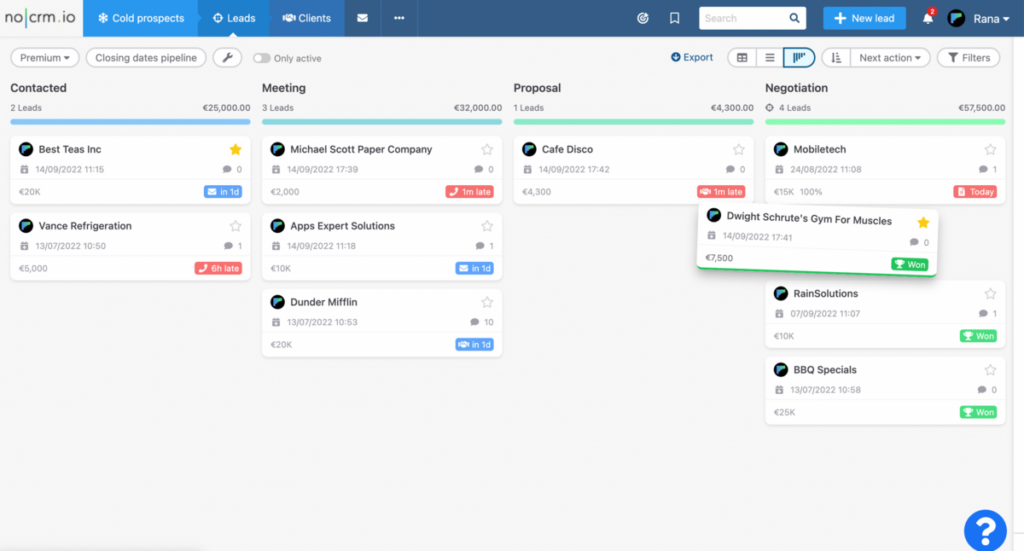
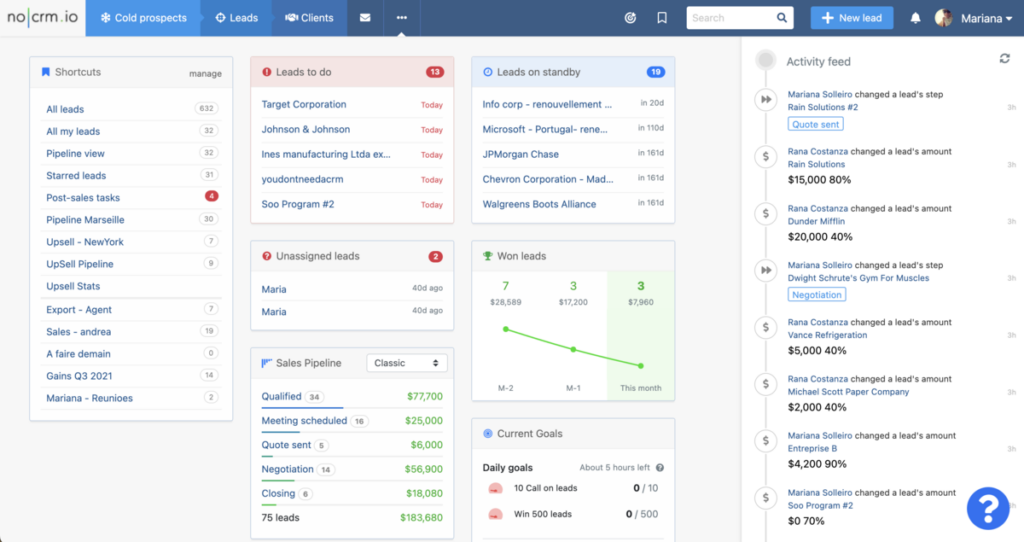
noCRM offers a clean, minimalist dashboard designed to keep salespeople focused on the immediate next actions needed to move leads forward. The dashboard provides shortcuts to different pipelines, leads to do, leads on standby, won leads, unassigned leads, current goals, and the current states of sales pipelines presented in minimalist graphs or lists. Its customizable pipeline view (with drag and drop) is straightforward and action-oriented, emphasizing simplicity and speed over detailed analytics. This approach aligns with noCRM’s philosophy of removing distractions so sales teams can prioritize selling.
Users appreciate noCRM’s dashboard for its ease of use and how it streamlines daily workflows, allowing them to quickly see what needs attention without navigating through complex menus.
Pipedrive’s Dashboard and Pipeline
Pipedrive provides a comprehensive and customizable dashboard that includes detailed sales metrics, activity timelines, and reporting widgets too. The dashboard is designed to give managers and sales teams more in-depth visibility into deal progress, team performance, and sales forecasts. Pipedrive’s pipeline view features a visual drag-and-drop interface that supports multi-stage sales processes and allows users to customize pipelines extensively.
While this richness offers powerful insights and control, it can also introduce complexity. Sales reps focused on daily execution may find the interface dense, requiring regular maintenance to keep data current and relevant.
Comparison Summary
- noCRM’s dashboard and pipeline prioritize simplicity, speed, and actionability, making it ideal for sales teams that want to minimize administrative overhead and focus on closing deals quickly.
- Pipedrive’s dashboard and pipeline provide robust analytics and customization options, better suited for teams that require detailed reporting, multi-stage deal management, and managerial oversight.
Choosing between the two depends on your sales team’s needs: streamlined, fast-paced selling versus comprehensive process management and analytics.
Integration Philosophy: Ecosystem vs Best-of-Breed
How each platform connects with your existing tools reveals fundamentally different philosophies, which can also be seen in various sales closing techniques used to help reps close more deals.
noCRM adopts a best-of-breed, no-code approach:
- Leverages Zapier for seamless connection to virtually any tool
- Integrate with email providers, calendars, telephony (VoIP), and marketing platforms
- No native bloat: prospecting-heavy teams can pipe data from external sources effortlessly
- Flexibility to work with Gmail, Outlook, and specialized industry tools
Pipedrive offers a proprietary ecosystem:
- Native apps and marketplace integrations
- More comprehensive built-in connections
- Often requires technical setup for full functionality
- Some users note “limited integrations” in certain contexts; you can analyze the effectiveness of your sales process and integration performance with detailed pipeline statistics and reporting.
The cost implications matter here. noCRM’s approach means you use what you already have. Pipedrive’s ecosystem may require adapting your workflow to their platform or purchasing additional connection features.

Sales Team Considerations: Fit, Adoption, and Workflow Impact
Selecting the right customer relationship management (CRM) platform (whether it’s noCRM or Pipedrive) goes beyond comparing features and pricing. The real impact comes from how well the software fits your sales team’s workflow, how easily your salespeople can adopt it, and how effectively it supports your sales process from lead management to closing deals efficiently.
Fit for Your Team and Sales Process
noCRM is designed for sales teams that value simplicity and speed, making it a strong choice for small businesses or companies that want to avoid the complexity of traditional CRM systems. Its lead management software is streamlined, allowing salespeople to focus on selling rather than administrative tasks. Pipedrive, on the other hand, offers a robust suite of analytics features, integrations, and customization options, making it ideal for teams that need detailed reporting, advanced pipeline management, and the ability to manage complex sales processes.
Adoption and Onboarding
The ease with which your team can start using a CRM is crucial. noCRM’s intuitive interface and minimal setup mean your team can get up and running quickly, reducing downtime and accelerating productivity. Pipedrive’s comprehensive feature set may require additional training and onboarding, but it can pay off for teams that need in-depth analytics and reporting.
Workflow Integration and Customization
Consider how each platform will integrate with your existing tools—such as Gmail, Outlook, and other marketing or category-specific software. Most CRM platforms offer integrations, but the approach can vary. Some rely on automation platforms like Zapier to enable flexible, modular connections across a wide range of tools. Others provide a more native, all-in-one ecosystem with built-in integrations and tighter coupling between features. Evaluate which integration model best aligns with your current stack, internal expertise, and long-term needs. Customization is equally important: ensure the CRM allows you to tailor features and workflows so it can adapt to your sales process and scale as your business evolves.
Security and Connection
Security is non-negotiable when it comes to customer data. Review each platform’s security protocols and connection standards to ensure they meet your company’s requirements. This is especially important for companies handling sensitive customer information or operating in regulated industries.
Cost and Pricing Model
Beyond the monthly subscription, consider the total cost of ownership—including training, integrations, and ongoing support. noCRM’s transparent pricing and lack of hidden add-ons can be attractive for small businesses, while Pipedrive’s pricing offers scalability for growing teams.
Ease of Use and Human Factor
A CRM should empower your salespeople, not slow them down. Assess the user experience and how the platform supports your team’s focus and work style. The right CRM will feel like a natural extension of your sales process, making it easier to manage leads, respond to customers, and close deals efficiently.
Pipedrive is considered easy to use with a clean interface, but it may involve a steeper learning curve due to its broader range of features. noCRM is highly rated for its ease of use with a score of 4.8/5 and requires minimal training. Its simplicity and lead tracking functionalities make it a great choice for consultants. noCRM also excels in simplicity and lead management, making it highly intuitive for sales teams prioritizing lead conversion and contributing to overall efficiency.
What Sales Professionals Say
noCRM Users Appreciate
Reviews across platforms reveal consistent themes from noCRM users:
- Lightning-fast prospecting and lead capture through the Lead Clipper
- Elimination of administrative overhead and complex reporting requirements
- Focus on selling activities rather than data entry
- Transparent pricing with no hidden feature restrictions
One reviewer captured it well: “If you’ve had trouble picking a CRM, give noCRM a try.” The platform earns a 4.7/5 ease-of-use score on SourceForge, with users calling it a “perfect easy to use system.”
Pipedrive Users Value
Pipedrive garners a 7.9/10 likelihood-to-recommend score on TrustRadius from 71 ratings. Users highlight:
- Comprehensive reporting and sales analytics for management oversight
- Detailed pipeline visualization and deal progression tracking
- Extensive customization options for complex sales processes
- Frequent updates and platform improvements
One user described the transition from spreadsheets to Pipedrive as moving away from a “headache inducing” system to organized pipelines. The platform makes sales work “fun to do.”
Pricing and Hidden Costs Overview
Beyond monthly subscription fees, the true cost of ownership varies significantly between Pipedrive and noCRM approaches.
Both noCRM and Pipedrive utilize a per-user, per-month subscription model with discounts for annual billing.
Pipedrive offers four different pricing plans: Lite, Growth, Premium, and Ultimate. The Lite plan starts at $14 per user per month, while the Enterprise plan is priced at $79 per user per month (billed annually).
noCRM includes three plans: Starter, starting at $13 per user per month; Expert; and Dream, which starts at $39 per user per month (billed annually).
| Cost Factor | Pipedrive | noCRM |
|---|---|---|
| Entry Price | $14/user/month (Lite) | $13/user/month (Starter) |
| Mid-Tier | $39/user/month (Growth) | $26/user/month (Expert) |
| Advanced | $59/user/month (Premium) | $39/user/month (Dream) |
| Enterprise | $79/user/month (Ultimate) | – |
| Setup Fees | None, but time investment is high | None, minimal time investment |
| Add-on Costs | Marketing automation, advanced analytics | No hidden add-ons |
| Integration Costs | Some native integrations included; additional third-party integrations may require subscriptions (e.g., Zapier) | Integrations primarily via Zapier, which may require a separate subscription |
ROI Timeline Differences:
- noCRM users report operational readiness in minutes, meaning faster time-to-productivity
- Pipedrive’s configuration depth means longer before seeing full returns
- For small businesses prioritizing speed, noCRM’s quick setup translates to earlier deal closures
The decision isn’t just about monthly fees. Factor in the hours spent on configuration, training, ongoing maintenance, and the potential cost or benefits of connecting the platform to your other applications when calculating true platform cost.
Which CRM Approach is Right for You?
Choose noCRM if you want
- Prospecting-heavy sales teams focused on outbound activities
- Minimal setup time and immediate productivity gains
- Salespeople spending time selling, not managing complex CRM systems
- Transparent pricing without feature restrictions with add-ons
- Integration flexibility with your existing tool stack
- Speed over reporting—action matters more than analytics
noCRM provides excellent lead tracking and follow-up features, ensuring that no potential opportunity slips through the cracks. The platform excels for teams where leads need to convert quickly and sales cycles are driven by individual rep velocity rather than committee oversight.
Choose Pipedrive if you want
Pipedrive makes more sense when these factors drive your decision:
- Detailed sales reporting and management analytics
- Complex deal management with multiple approval stages
- Extensive customization options for unique sales processes
- Built-in ecosystem of integrated business tools
- Team performance metrics and advanced analytics dashboards
Organizations with dedicated sales operations roles, managers who need visibility across teams, and companies with multi-stage approval processes will find Pipedrive’s depth valuable.
The Anti-CRM Verdict
After completing this Pipedrive noCRM comparison, the distinction comes down to user persona:
Pipedrive is designed for managers requiring complex reporting; noCRM is designed for salespeople who need speed.
Consider your team’s primary focus:
| Priority | Best Fit |
|---|---|
| Administrative oversight and forecasting | Pipedrive |
| Active selling and prospecting velocity | noCRM |
| Complex multi-stakeholder deals | Pipedrive |
| Quick lead capture and follow-up | noCRM |
| Team performance dashboards | Pipedrive |
| Rep productivity | noCRM |
Both platforms excel in their intended use cases. They serve fundamentally different sales philosophies, and the right choice depends on whether your organization values oversight or velocity more.
For industries and companies where salespeople are the engine—not the data they generate—noCRM’s anti-CRM approach removes the friction that slows down human connection with customers.
Ready to see if the speed-first approach works for your team?
Try noCRM 15 days for free and experience the difference a streamlined lead management platform can make for your sales process.
Frequently Asked Questions (FAQ)
The primary difference lies in their approach: noCRM focuses on simplicity and speed, helping salespeople quickly capture and manage leads with minimal setup. Pipedrive offers a more comprehensive CRM experience with advanced customization, detailed reporting, and pipeline management suited for complex sales processes.
noCRM is often preferred by small businesses or sales teams that prioritize fast setup and streamlined lead management without the complexity of traditional CRM systems. Pipedrive can also serve small businesses well but is better suited for those needing detailed analytics and customization.
noCRM helps salespeople focus on the next action and reduces administrative overhead, accelerating deal closures. Pipedrive provides robust analytics and pipeline management tools that help sales teams and managers track performance and optimize sales strategies.
Both Pipedrive and noCRM provide customization options for pipelines and fields.
