




Summary
- Bulk email templates help sales teams save time by avoiding repetitive manual email tasks.
- noCRM’s Dream Team Edition enables users to send personalized email templates to up to 50 leads at once.
- Sent emails and replies are automatically logged in noCRM, keeping lead records up to date.
- Custom variables personalize each message, boosting engagement without extra manual work.
- The feature is easy to use and directly integrated into your pipeline workflow.
Sending bulk emails is a precious asset for sales and marketing: it allows you to send the same emails to a list of leads in just a few clicks.
There are numerous cases in which a salesperson has to send the same email over and over again, copy-pasting the email content, and changing a few fields such as the name of the lead, manually… Obviously, this makes salespeople lose too much precious time.
Well, good news! You can now send bulk email templates with noCRM.
What are the pros of bulk sending email templates with noCRM?
Bulk sending email templates with the lead management tool noCRM can definitely improve your daily sales tasks. Here are a few benefits this feature will provide to your sales team.
Saving time on repetitive tasks
We cannot stress this enough, but salespeople need to focus on what they do best: selling. Still, their focus is constantly disrupted by manual tasks, including sending the same emails to several leads.
By setting up email templates on noCRM, sales can already save some precious time. But by being able to send them to multiple leads at the same time, they decrease even more manual operations! This will allow them to bulk send email templates for follow-ups on the same type of lead for instance, or even at the closing to get feedback from their leads.
Also, noCRM email templates allow you to define custom variables, this way your emails will be personalised for each lead, without having to manually update each field (name, website, etc.).
Improving lead management to increase sales
The other main benefit of internalizing this process in noCRM is that the emails sent, and the replies received, will all be registered in the lead management software.
This way, your sales can quickly access previous exchanges or reply to an incoming email directly from noCRM, and manage the lead efficiently to make it move through the different sales steps.
Not only does this save salespeople time by not having to manually add the information to their CRM, but it also makes the sales process smoother as they immediately know where the lead stands, what the last action taken was, and what the next will be.
How to send bulk email templates with noCRM
Sending bulk email templates with noCRM is really simple. And if you still haven’t created a noCRM account yet, you can try it for free for 14 days (note that this feature is part of the Dream Team Edition).
Once you are logged in to your noCRM account, you have to head over to your pipeline and select the compact mode.
From there, select the leads you want to send the email template to (limited to 50 leads) and click on “Send email template”. Next, you’ll need to select the needed template.
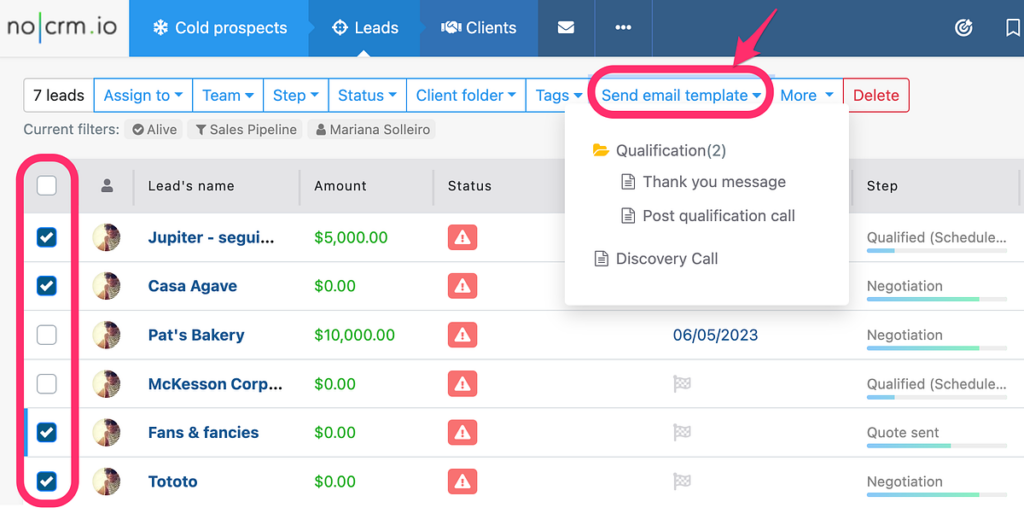
A great asset of this feature, is that noCRM will then open the list of leads selected, inform you if all the email addresses and variables required are correctly set, and allow you to review the emails if needed.
When your emails are good to go, just click “Send” and voilà! Your email template is sent to the different leads in no time.
If you’d like to have more information about noCRM’s bulk send email templates feature, you can follow this link.
Ready to start saving time and increasing sales efficiency? Start your free 14-day trial of noCRM and experience the power of bulk email templates today.