





Summary
- noCRM focuses on simplicity and speed for salespeople, while Freshsales offers a more complex and feature-rich platform for management visibility.
- noCRM enables immediate adoption with minimal setup, whereas Freshsales often requires more time, training, and configuration.
- The right choice depends on your sales approach: fast prospecting and action or advanced automation and analytics.
Choosing the right customer relationship management platform can feel like picking between two completely different philosophies. On one hand, you have noCRM—a tool built for salespeople who hate admin work. On the other, Freshsales—a comprehensive solution designed for managers who need visibility into every detail.
Both platforms promise to improve your sales process and help you close more deals. But they take radically different paths to get there, especially in how they manage prospects and leads.
This comparison breaks down everything you need to know: pricing, features, ease of use, and most importantly, which platform fits your team’s actual workflow. No fluff. Just the data you need to make a decision.
What Makes These CRM Platforms Unique?
noCRM - “The Anti-CRM” Simplicity
noCRM calls itself the “Anti-CRM” for a reason. It’s built on a simple premise: salespeople should spend time selling, not filling out forms.
The platform strips away everything that slows sales teams down. No mandatory fields. No complex admin setup. No weeks of training before your team can use it productively.
What makes noCRM different:
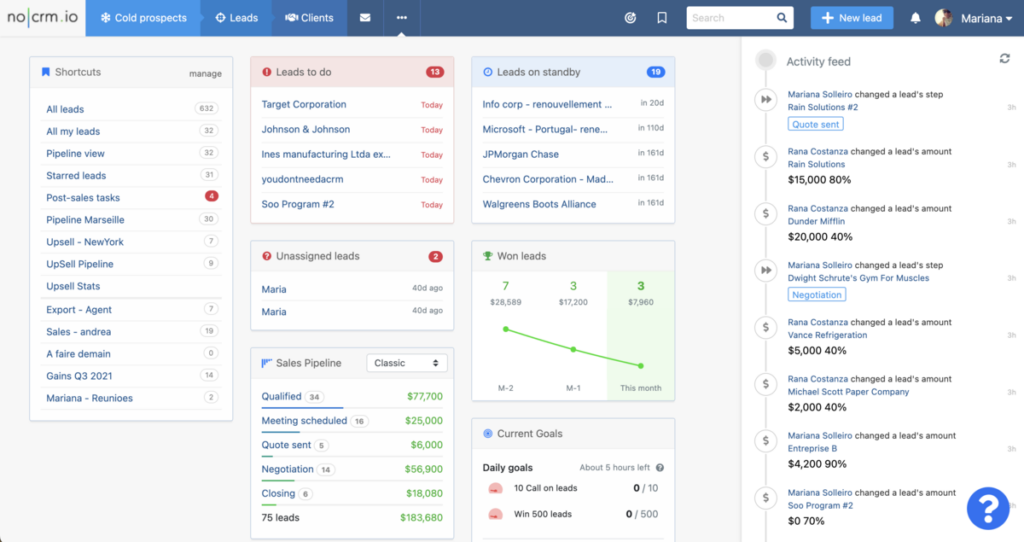
- Streamlined pipeline view that shows exactly what to do next
- Lead Clipper for capturing leads in seconds from LinkedIn, websites, or business cards
- Prospecting Lists designed specifically for outbound sales workflows
- Setup time measured in minutes, not weeks
- Email and phone activity synced through integrations
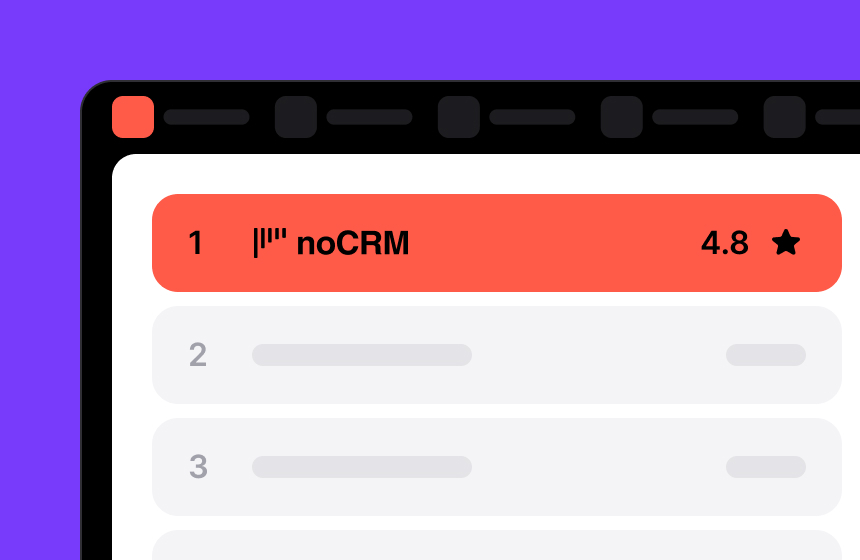
With a 4.8 ease of use rating on Capterra (above the 4.5 category average), users consistently praise the drag-and-drop pipeline, intuitive interface, and minimal learning curve. One review sums it up: “I really like noCRM for lead management. It is very intuitive. I love the drag and drop feature for leads to move them along the pipeline.”
Summary: noCRM is designed for salespeople who need speed.

Freshsales - Full-Featured CRM Excellence
Freshsales takes the opposite approach. It is a comprehensive automation solution designed for organizations that require detailed reporting, complex workflows, and enterprise-level control.
The platform includes everything from lead scoring to sales automation to behavior tracking to built-in communication tools. Managers get the analytics they need. Admins get the customization options they want.
What Freshsales delivers:
- High platform customization capability
- High workflow capability score for complex automation needs
- Advanced analytics with customizable dashboards
- Phone and email integration with behavior tracking
- Marketing automation included in the platform
Freshsales scores 4.4 on Capterra for ease of use, but the product’s wide range of features creates a learning curve.
Summary: Freshsales is designed for managers requiring complex reporting, while solutions like noCRM simplify the whole process, from cold prospects to invoicing and quote creation.
noCRM vs Freshsales: Key Differences Breakdown
Complexity Matrix
noCRM's simplicity isn't a limitation. It's a deliberate design choice. The platform focuses on what drives sales, streamlining everything else.
What noCRM streamlines to accelerate your sales:
- ✅ No complex admin setup processes
- ✅ No overwhelming dashboard configurations
- ✅ No multi-level approval workflows
Each simplification is intentional. When your sales team isn't bogged down by mandatory fields, they capture leads faster. When there's no complex admin panel, you start closing deals on day one.
Freshsales includes all these capabilities—which might be what enterprises need. But for small businesses and lean sales teams, that complexity becomes overhead.
The trade-off is clear: Freshsales gives you control and visibility at the cost of setup time and complexity. noCRM gives you speed and simplicity at the cost of advanced customization.
Free vs Hidden Costs Comparison
Freshsales has a higher pricing structure compared to noCRM. noCRM's plans start at $13 per user/ per month (billed annually) and can go up to $39 per user/ per month (billed annually). In comparison, Freshsales plans start at $9 per user/ per month (billed annually) and can go up to $59 per user/ per month (billed annually).
The sticker price only tells part of the story. Total Cost of Ownership includes implementation, training, and ongoing management.
For organizations with dedicated CRM administrators and complex processes, Freshsales’ comprehensive approach delivers value. For teams that want to start selling immediately, noCRM’s focused approach reduces total cost significantly.
Ecosystem vs Best-of-Breed Integration
How you connect your CRM to other tools matters. The two platforms take fundamentally different approaches.
noCRM: Best-of-Breed Integration
noCRM emphasizes seamless connection with external tools through Zapier and no-code platforms. Users specifically praise “the native integration with other tools, such as Gmail and Google Calendar” or VoIP, as productivity-enhancing.
This approach means:
- Connect with virtually most in your existing stack
- No vendor lock-in to a specific ecosystem
- Flexibility to swap tools as needs change
- No feature duplication or redundant licensing
Freshsales: Native Ecosystem
Freshsales offers deeper native integrations within the Freshworks ecosystem with some tools. Marketing automation, customer support, and analytics connect without external connectors.
This approach means:
- Tighter integration between related functions
- Single vendor relationship
- Consistent interface across tools
- Potentially higher total software spend
For teams with established tool stacks, noCRM’s flexibility is ideal. For organizations starting fresh or committed to Freshworks, the native ecosystem reduces integration complexity.
Sales Pipeline Management: How Each Platform Delivers
Effective sales pipeline management is at the heart of any successful sales process. Both noCRM and Freshsales offer tools to help sales teams manage their pipelines, but their approaches cater to different needs and preferences.
noCRM focuses on simplicity and speed, providing users with an intuitive interface that makes it easy to move leads through each stage of the sales pipeline. Features like customizable workflows allow salespeople to prioritize prospects and tailor their approach, while visual pipeline tools give a clear overview of deals in progress. This streamlined approach helps sales teams quickly identify next steps and keep momentum high, making noCRM a strong choice for teams that value ease of use and rapid action.
Freshsales, on the other hand, delivers a more robust set of sales pipeline management features. With advanced analytics and automated workflows, Freshsales enables teams to dive deep into pipeline data. Users can track key metrics and leverage detailed reports to improve performance.
Whether your team needs a straightforward tool for managing leads or a powerful platform for in-depth analytics and automation, both noCRM and Freshsales offer solutions tailored to different sales pipeline management needs.
Pricing Comparison: Starter vs Enterprise Needs
Transparent pricing helps you plan. Here’s what each platform costs.
noCRM Pricing Tiers:
noCRM’s pricing is straightforward. No hidden fees. No surprise charges for basic features.
Freshsales Pricing Considerations:
Freshsales offers multiple tiers with varying feature sets. Enterprise plans include advanced analytics, customizable workflows, and dedicated support. Exact pricing depends on features needed, team size, and additional add-ons that can enhance functionality.
ROI Timeline Comparison:
- noCRM: Immediate productivity. Teams often report value from day one.
- Freshsales: Longer implementation cycle. ROI typically realized after full deployment and team adoption.
For small businesses watching every dollar, noCRM’s lower entry point and faster time-to-value make financial sense. For enterprises with budget for proper implementation, Freshsales’ comprehensive feature set may justify higher costs.
What Sales Teams Say About Each Platform
noCRM Users Love
Real user feedback reveals consistent themes:
- Immediate productivity gains: “This CRM offers everything to run my day to day sales. I really have not found any downsides with this application.”
- Focus on prospecting over administration: Users praise the lead capture forms, email templates, and the ability to create leads “in seconds from email, mobile, business card, websites, spreadsheet.”
- Intuitive interface: “Its simple on the surface but allows depth of content capture if you need it.”
Freshsales Users Love
- Comprehensive reporting: Managers appreciate visibility into team performance, pipeline health, and forecasting accuracy.
- Workflow automation: Complex sales processes with multiple approvals and handoffs work smoothly with workflow capability.
- Quality of support: Freshsales scores high for support portal and knowledge base. Enterprise customers appreciate formalized support infrastructure.
Target Use Cases: Inbound vs Outbound Focus
The comparison becomes clearer when you consider how your team actually sells.
noCRM: Superior for Prospecting-Heavy Teams
If your sales process starts with outbound prospecting, noCRM has distinct advantages:
- Lead Clipper captures prospects from anywhere in seconds
- Prospecting Lists organize cold outreach systematically
- Speed-focused design reduces time between identifying a prospect and making contact
- No mandatory fields means leads enter the system instantly
- Native integrations with VoIP tools
noCRM is ideal for:
- SDR and BDR teams focused on outbound
- Field sales teams needing mobile-first tools
- Startups and SMBs with lean sales operations
- Companies prioritizing speed over complex tracking
- Solopreneurs
Freshsales: Stronger for Inbound Lead Nurturing
If leads come to you through marketing, Freshsales’ depth makes sense:
- System prioritizes the hottest prospects automatically
- Behavior tracking shows exactly how leads engage with your content
- Marketing automation nurtures leads until they’re sales-ready
- Analytics reveal which campaigns drive conversions
Freshsales suits:
- Marketing-driven organizations with inbound funnels
- Companies with complex, multi-touch sales cycles
- Enterprises requiring detailed reporting for management
- Organizations needing marketing and sales alignment
Which CRM Platform Is Right for You?
Choose noCRM if you want:
- Speed over complexity: Your team needs to start selling today, not next month
- Minimal admin overhead: Data entry should take seconds, not minutes
- Prospecting focus: Outbound sales and lead generation drive your business
- Integration flexibility: You already have tools you love and want to keep using them
- Cost-effective solution: SMBs and startups with budget constraints
- Salespeople-first design: Your reps hate traditional CRM and resist adoption
noCRM is suitable for teams that view administrative work as friction that reduces selling time. The platform streamlines the path from lead capture to deal closure.
Choose Freshsales if you want:
- Comprehensive management: You need visibility into every aspect of the sales pipeline
- Advanced analytics: Data-driven decisions require robust reporting
- Marketing alignment: Lead scoring and behavior tracking matter to your process
- Enterprise customization: Complex workflows and approval processes are necessary
- Manager visibility: Leadership needs detailed performance insights
Freshsales caters to organizations where standardized processes and detailed tracking justify the implementation investment.
The Final Verdict
The noCRM vs Freshsales decision ultimately comes down to one question: What does your sales team actually need?
Implementation reality:
- noCRM: Your team can be productive within hours of signing up
- Freshsales: Plan for weeks of configuration before full adoption
noCRM and Freshsales offer trials that let you explore the interface, test integrations, and see how your team responds. The right CRM isn’t about features on paper—it’s about fit with your workflow.
For teams looking to compare additional crm solutions, consider how each platform handles what matters most to your specific requirements: Is it speed to first action? Depth of analytics? Integration with existing tools? The answer guides the choice.
The future of your sales success depends on giving your team tools that help rather than hinder. Choose the platform that makes completing their daily tasks easier, not more complicated.
Learn what works for your team. Then make the decision with confidence.
Ready to see how noCRM can simplify your sales process? Try noCRM free for 15 days and experience firsthand how it empowers your salespeople to close deals faster.
Frequently Asked Questions (FAQ)
What is the main difference between noCRM and Freshsales?
The primary difference lies in their approach: noCRM focuses on simplicity and speed, designed for salespeople who want to minimize administrative tasks, while Freshsales offers a CRM solution with advanced features and detailed reporting, suited for managers.
Which CRM is better for small businesses?
noCRM is often recommended for small businesses and startups due to its ease of use, affordability, and quick setup. Freshsales, while also suitable for small businesses, may be better for those looking for more advanced features and scalability.
Is there a learning curve for these CRMs?
noCRM is known for its minimal learning curve and intuitive interface, enabling salespeople to get started quickly. Freshsales offers more features and customization, which can require more training and onboarding time.
Focus on selling, not managing tools