

Summary
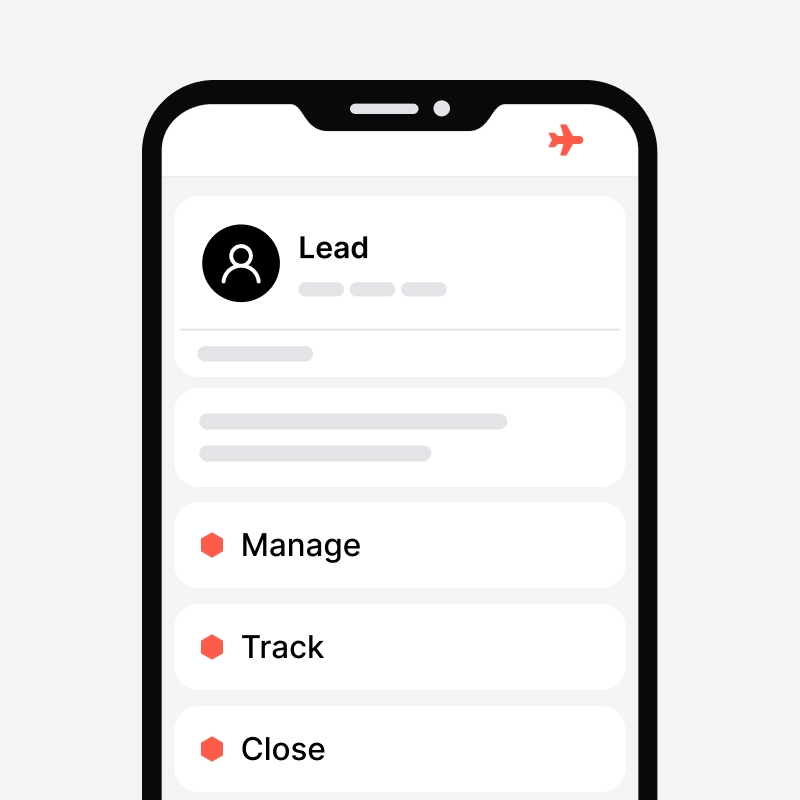
- The noCRM Android app gives sales reps access to their prospects, leads, activities, and sales pipeline wherever they are, including offline access.
- Mobile features such as business card scanning, reminders, speech-to-text, one-click calls and emails, help reps save time and stay on top of follow-ups.
- Sales managers can also track team activity and lead updates from mobile, making it easier to keep the sales process moving while away from the office.
Long gone are the days when working in sales meant perusing your Rolodex and cold-calling using a manual telephone. Today, the business world is more connected than ever. It’s common for executives to take important calls on the go, and it’s just as common for business relationships to develop in real time across multiple time zones.
All of this means that it’s critically important you’re able to access all your data wherever and whenever you need to. You never know when you’ll need to strike while the iron is hot, and the last thing you want is to be caught unawares just as a red-hot deal is about to be closed.
As a sales professional, you’re definitely already using a CRM system to manage your leads and deal progress. But what are you supposed to do when you get caught away from your desk or while traveling for business and don’t have immediate access to your information?
Always Ready to Close: the noCRM App & How It Can Help
Luckily for both your team and your potential customers, this isn’t a problem without a solution. noCRM actually offers the perfect answer to this conundrum—a mobile app that offers all the features and functionality you need, whenever and wherever you need them. The mobile app can even be used offline to view and update your leads!
It was designed for sales professionals to improve prospect and lead management, enhance productivity, and drive more successful sales outcomes in both the short- and long-term. Perfect for rookie sales reps just getting their toes wet in the industry as well as veterans who’ve been around the block more than a few times, it gives you all the flexibility you need to close on your hottest deals at a moment’s notice.
There is a point worth making here, though. Because they’re so used to using desktop CRM software, sales reps can often find it tricky to change up the workflow and switch to a mobile version of the same tool. That’s why we’ve decided to create a handy guide that walks you through all the features of the noCRM Android mobile app. This way, once you’ve finished reading the article, you’ll be ready to download and dive straight in, rather than needing a lengthy adjustment process.
But that’s more than enough preamble. Let’s dive straight into discussing the noCRM mobile app and how it can help you smash your sales goals going forward.
noCRM Mobile App Key Features
Prospecting Lists and Prospects Management
Prospects and leads are not the same. Leads are hot contacts that have already shown interest in your product or service and need to be moved through each step of your pipeline toward closing.
Prospects, on the other hand, need to be qualified first—you have to contact them initially and determine if they could potentially lead to a sale.
Just like the desktop version, the noCRM mobile app allows you to separate both leads and prospects, ensuring you apply the right process to each and avoid wasting time on cold prospects that will never convert.
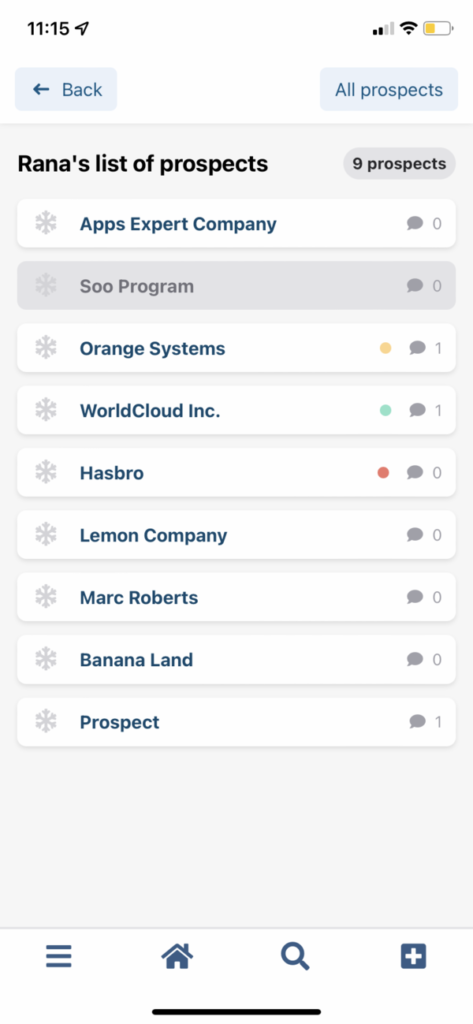
With the noCRM mobile app, you can easily view your prospecting lists, see which prospects have been canceled or turned into leads, and identify those still in need of attention.
You can then work on qualifying cold prospects on the go, update their information and activities, and even convert them into leads directly from the app.
Lead Creation
Creating leads is the first step of any sales team’s process. After all, it’s impossible to move deals through your pipeline if you don’t have any deals to work with. And deals, whether big or small, all start at the same place: leads.
At first glance, creating leads might seem like a major task to handle in a mobile app. With so much information needing to be filled in, and so many potential ways to go wrong, you could be forgiven for thinking it’s simply too much to entrust to your phone. That’s not the case, though: the noCRM mobile app’s lead creation tool is as intuitive and straightforward as filling out a few fields.
Simple text boxes take the confusion out of creating new leads, making it immediately obvious where to enter all the relevant information you need. Other than creating a new lead manually, you can also choose to scan business cards or create leads by forwarding emails in just a few seconds. And once you’ve created each one, it’ll be automatically stored in your database for easy retrieval.
Business Card Scanning

Business cards are part and parcel of the sales world, especially at in-person events like conferences or trade shows. But in some senses, they belong to an older time. Back before CRM software exploded in popularity along with the rest of sales-related technological tools, business cards used to be the only way you could get a potential prospect’s information.
Don’t get us wrong: they’re still just as useful and as popular as ever. It has led to an interesting problem, though, whereby sales reps have to manually enter data from a business card into their CRM of choice to create the lead. Or, rather, that used to be the case—because the noCRM mobile app has an answer.
Simply scan the business card in question with your mobile app and the lead will be automatically created and populated with the prospect’s information. You don’t need to worry about manual error creating bad data or clogging up your pipeline with an unactionable lead. Plus, you’ll finally be able to take full advantage of all the in-person opportunities you’re presented with, while still seamlessly integrating everything with your existing workflow.
Lead Updates
Of course, leads rarely stay the same throughout the lifetime of a deal. New activities may require certain data points to be updated, or the point of contact for a given company might change based on internal personnel restructuring. No matter what the reason, it’s vital you have a way to update and manage your leads at a moment’s notice.
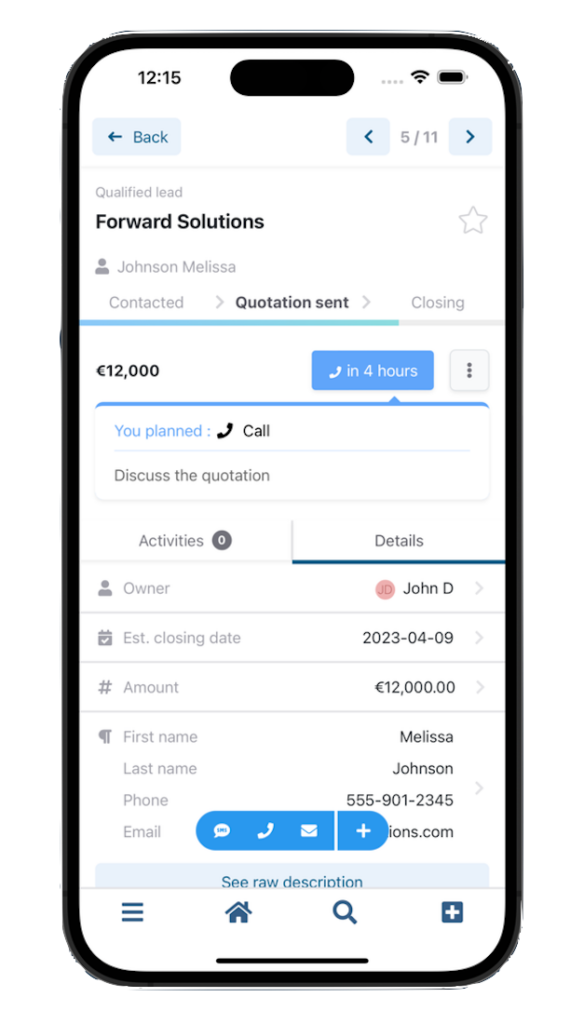
Luckily, noCRM’s Android app makes managing your leads every bit as easy as creating them. By simply navigating to the lead you’ve already created in the app and clicking on details, you’ll be able to add, delete, or update any info you need to with just a few taps of a button.
Lead Management and Follow-Up
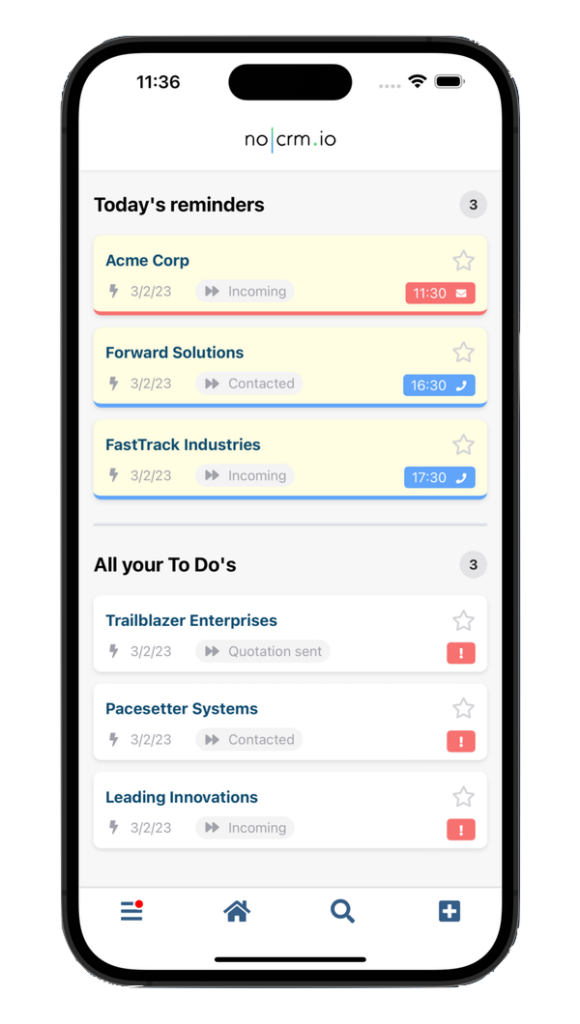
The noCRM mobile app is designed to make it easier for sales reps, even on the go, to prioritize their leads and ensure they never miss a follow-up. When you log in, you’re immediately taken to your to-do list. At a glance, you’ll be able to see all the leads you need to work on today, helping you stay organized at all times.
You can also set reminders for your leads directly within the mobile app. Simply select the date you’d like to follow up and the activity you plan to do, and voilà! You’ll never miss the next follow-up.

Activity Updates
As you work on your deals, you’ll want to keep a close eye on every interaction you’re having with the prospect. At noCRM, we’ve been in the sales game for long enough to know that the more friction you add, the harder everybody’s life becomes. That’s why we designed our Android mobile app to make it easier to take action on a lead. All you need to do is open the lead view inside the application itself and click one of the icons in the “Activity” screen to get busy.

You’ll then be able to make a call, send an email or SMS in just one click. The app will open your phone's default apps with the necessary details pre-filled—like opening the phone app with the number ready to dial or an SMS app ready for you to type your message. After making a phone call, the noCRM app prompts you to log the outcome so you can keep track of the activity. And if you want to track an activity that isn’t provided for in one of the icons themselves, we’ve made that possible as well.
Oh, you are on the move and don’t have time to manually type in the outcome of your sales activity? We've got you covered! With our speech-to-text feature, you can simply speak the comment you'd like to add, and the app will automatically transcribe it for you.
And if you want to track an activity that isn’t provided for in one of the icons themselves, we’ve made that possible as well. Thanks to these features, there’s nothing stopping you from ensuring every lead is as up-to-date as possible, all the time.
WhatsApp Pre-Filled Messages
In today’s hyper-connected business environment, more and more businesses are exploring newer technological means of staying in touch. Long gone is the era of the Rolodex and the manual telephone. Nowadays, modern sales reps need to be ready and capable of getting in touch however suits the prospect, leveraging a variety of different tools and software programs in order to stay flexible and on-target.
WhatsApp is the perfect example of exactly this phenomenon. No longer the domain of friends wanting to keep in touch, more and more companies are turning to the world-famous application in order to manage their ingoing and outgoing communication. Thankfully, noCRM’s app allows you to save precious time by setting up WhatsApp templates: with just a click a pre-filled message opens on WhatsApp, ready to be sent to the right lead.
These templates will have to be previously set from the desktop version of noCRM. Learn more on how to do so here.
Pipeline Updates
Every salesperson knows their own pipeline like the back of their hand. After all, it’s the bread and butter of your day-to-day activities as a rep. That’s why the noCRM mobile app was built from the ground up to center around the pipeline itself, making life easier for your entire team as you work on nurturing leads and progressing deals towards the finish line.
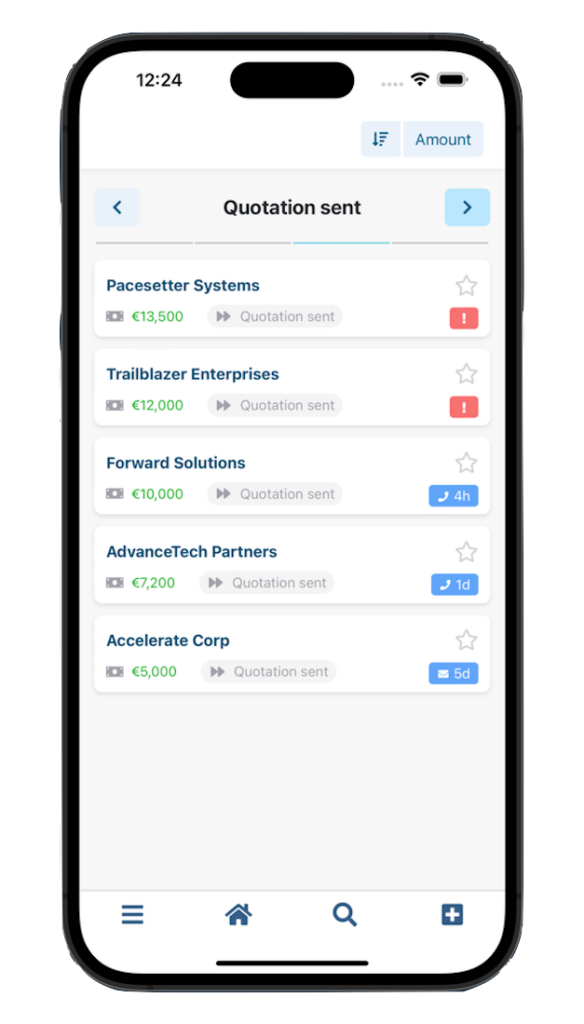
Moving deals through the pipeline is as easy as updating the status of each one, based on the prebuilt stages you’ve already defined as part of your sales process. And because the app syncs information with your desktop software, by the time you get back to your desk you won’t have to repeat any of the tasks you already accomplished on your mobile.
Regardless of whether you’re juggling dozens of deals or hyper-focusing on a few critical prospects, the Android app makes it easy to stay on top of everything you’ve got on your plate, no matter where you are.
Tracking Sales Team’s Activities and Leads

As a sales manager, staying in the loop with your team's latest activities is essential. With noCRM's mobile app, accessing the "Activity Feed" allows you to effortlessly track recent updates: newly logged activities, status changes, won leads, etc.
You can also easily navigate to the relevant leads with just a click, enabling you to add new comments and mention specific sales reps. Perfect for providing valuable feedback and support to your team!
From creating and managing leads to pipeline progression, activity updates, and even business card scanning, the noCRM Android mobile app offers everything you need to take your sales efforts on the go. With seamless synchronization to your desktop software and an ultra-intuitive workflow, it’s the perfect way to stay connected and on-target with all your deals, no matter where you are. So, really, there’s only one thing left to do: try it out for yourself!
You can find the app on both the Apple and Google Play app stores by searching for noCRM or download it by Scanning the QR code below. Once you’ve got it downloaded onto your mobile device, simply log into your existing noCRM account and you’re ready to go
If you’d like a more concise visual overview of the app’s core features, you can check out our handy introduction video below. Happy selling!
FAQ
Q: What features does the noCRM mobile app offer for sales professionals?
A: The noCRM mobile app offers features like lead and prospect management, business card scanning, lead updates, activity tracking, WhatsApp pre-filled messages, and pipeline updates to help sales professionals manage their tasks on the go.
Q: Can I use the noCRM mobile app offline?
A: Yes, the noCRM mobile app can be used offline to view and update your leads, ensuring continuous access and functionality even without an internet connection.
Q: How does the noCRM mobile app help with creating new leads?
A: The noCRM mobile app simplifies lead creation by allowing users to manually enter details, scan business cards, or create leads by forwarding emails, ensuring seamless integration with your sales process.
Take your sales pipeline anywhere