






Summary
- The right sales management software helps teams stay organized, automate repetitive tasks, and focus on selling instead of administration.
- Essential features include pipeline management, automation, reporting, mobile access, integrations, lead qualification, and team collaboration.
- Choosing a scalable and easy-to-use sales tool ensures higher productivity, better visibility into sales activities, and long-term business growth.
Effective sales management is crucial for driving growth and maintaining a competitive edge. But it’s not a straightforward challenge, and it never has been. With so many different elements to focus on, it can be easy to lose sight of the most important details.
Luckily, technology has come a long way towards revolutionizing several different industries in recent years, and sales is no exception to that trend. To keep on top of their sales processes, today’s companies need powerful sales management software that can streamline workflows, enhance productivity, and provide valuable insights into sales activities. However, with the plethora of options available on the market, choosing the right sales management software can be a daunting task.
That’s where we come in. We’ve decided to put together a handy guide, detailing all the essential features you need to keep an eye out for as you decide which sales management software to use. Whether you’re a small business looking to optimize your sales process or a large enterprise aiming to scale your operations, these key features will ensure you choose the best software to meet your needs.
Understanding Sales Management Software
Sales management software is designed to help businesses manage their sales activities more efficiently. The number of tasks it can augment is enormous, with tools on hand for everything from tracking customer interactions, managing leads, and automating tasks to analyzing sales data.
To put it simply, by centralizing and automating various aspects of the sales process, sales management software enables sales teams to focus on what they do best: selling.
Before diving into the features, it’s important to assess your specific needs and objectives. Consider the size of your sales team, the complexity of your sales process, and the specific challenges you’re facing. This will help you identify the features that are most critical for your business. There’s no one-size-fits-all solution out there, after all. The best software for you will be the one that answers the questions you’re going to ask it.
Essential Features of Sales Management Software
1. Sales Pipeline Management
Sales pipeline management is a critical feature that allows sales teams to visualize and manage their sales process more effectively.

A robust sales pipeline management tool should offer customizable pipelines, so you can tailor the sales stages to match your specific sales process, and visual representation, so your reps can have a clear, visual overview of where each lead is in the sales process, making it easier to prioritize and manage opportunities.
2. Automation of Routine Tasks
Automation is one of the biggest time-savers in sales management. By automating routine tasks, sales teams can focus more on selling and less on administrative work. Look for software that can automate things like follow-up reminders, data entry, and lead assignment.

If there are packages that can handle more automation, that’s even better, but those first few manual tasks are the most common, and therefore the most important to focus on.
3. Email Integration and Communication Tracking
Effective communication is the cornerstone of successful sales. Sales management software should integrate with your email system (e.g., Outlook, Gmail) to streamline communication, ensure that all interactions are tracked, and help you manage your outbound sales processes without any major headaches.

4. Reporting and Analytics
To make informed, data-driven decisions, sales managers need access to detailed reports and analytics. Fortunately, this is where your sales management software can come in handy.

To give you the data you need to make the right call at the right time, your software should ideally provide customizable reports, access to real-time data, and long-term performance metric tracking, highlighting core KPIs like win rates, average deal size, and sales cycle length.
5. Mobile Accessibility
Gone are the days when sales teams could afford to be planted behind their desks from nine to five. In today’s mobile-first world, sales reps need access to their tools and data on the go, making mobile accessibility a must for field sales teams who are constantly on the move.

If your sales management software has a dedicated app, that’s the ideal situation — but even if it doesn’t, try to look for a package that allows offline access, so critical data can be accessed, and essential tasks performed even in areas with poor internet connection.
6. Customization and Scalability
Your business is unique, and your sales management software should be able to adapt to your specific needs. Look for software that offers the ability to customize fields, workflows, and dashboards to match your sales process and business requirements. But don’t overlook scalability, either.
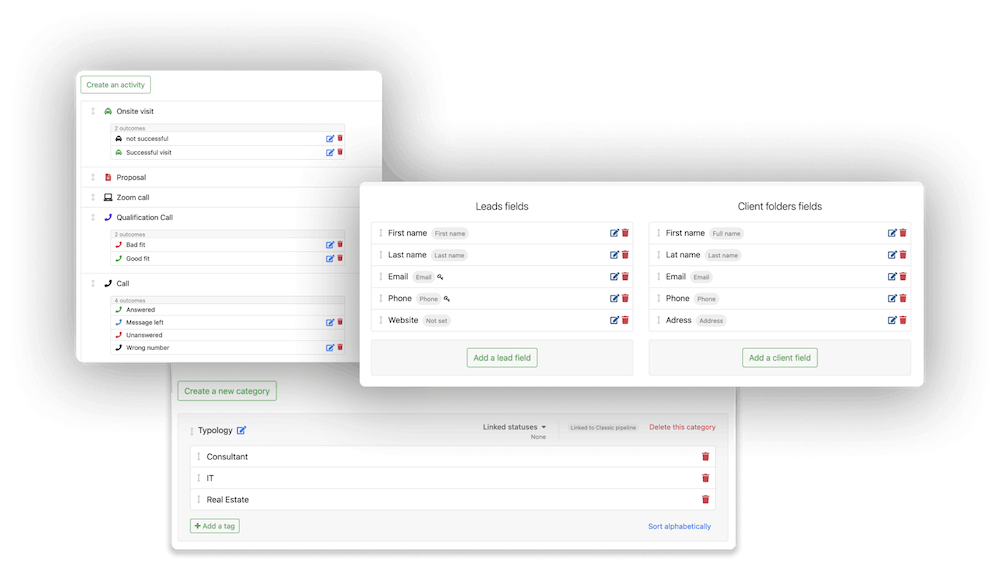
As you grow, it’s vital your software can scale to handle the increased demands you’ll make of it. That’s why it’s essential that your chosen sales management software can handle an increasing volume of leads, customers, and data — without compromising performance.
7. Integration with Other Tools
The modern, hyper-connected sales teams of today’s business world rely on a variety of tools to manage different aspects of their workflow, from marketing automation to customer support. If your sales management software can’t act as an effective linking point for these various auxiliary programs, you’re going to be dealing with a whole lot of headaches going forward.

To prevent the task from seeming too overwhelming, focus on essential integrations, like marketing automation platforms, customer support tools, and accounting or ERP systems for seamless invoicing, contract management, and financial reporting.
8. Lead Scoring and Qualification
Here’s one you’ve definitely heard before: not all leads are created equal. To preserve resources, morale, energy, and time, sales teams need to focus their efforts on the most promising prospects. That’s where lead scoring and qualification features come in, helping to prioritize leads by assigning scores based on their likelihood to convert.
Look for software that offers customizable scoring criteria, based on factors such as engagement level, demographics, and past interactions, as well as the ability to automate the lead scoring process to reduce the potential for manual error.
9. Collaboration and Team Management
Sales has always been a team effort. Effective collaboration is essential for closing deals and achieving sales targets, so your sales management software should facilitate teamwork and communication.

The key features to focus on in this respect are shared dashboards (which provide a visual overview of team performance, sales goals, and pipeline status) and collaborative task assignments, to ensure everybody’s aligned and working towards common goals. Plus, integrations with communication platforms like Slack or Microsoft Teams never go amiss.
10. Security and Compliance
Security and compliance are critical considerations when choosing any software, especially when dealing with sensitive customer data. Ensure that your sales management software offers robust security features like data encryption, to protect customer data with end-to-end encryption, both in transit and at rest, and access controls, i.e. role-based definitions that ensure only authorized users can access certain data or features.
11. Ease of Use and User Adoption
There’s no point having the best car in the world if you don’t have a driving license. Similarly, even the most feature-rich software is only effective if your sales team actually uses it. Ease of use is a critical factor in ensuring user adoption and maximizing the return on investment of your sales management software.
Consider prioritizing an intuitive interface that’s easy to navigate and use, and plenty of training resources (like tutorials, webinars, and user guides). Responsive customer support is always a plus, as is a smooth onboarding process that doesn’t require too many unnecessary steps before your team members are up and running.
Conclusion
Choosing the right sales management software is a critical decision that can have a significant impact on your sales team’s productivity and success. By focusing on the essential features outlined in this guide — such as sales pipeline management, automation, and reporting — you can ensure that you select a solution that meets your specific needs and supports your business goals.
Remember, the best sales management software is one that not only fits your current requirements, but also has the flexibility to grow and evolve with your business as you scale. Take the time to assess your needs, involve your sales team in the decision-making process, and thoroughly evaluate your options before making a final choice. With the right software in place, you’ll be well-equipped to drive sales performance, enhance customer relationships, and achieve sustained growth.
By the way, if you’re looking for a flexible, no-nonsense sales tool that just works, why not give noCRM a go? Designed to be as easy to set up as it is to use, noCRM takes the hassle out of managing your deals and allows your reps to focus on what they do best: closing more deals. Feel free to try out our free trial today — it might just be the best decision you make all quarter.
FAQ
Q: What is sales management software?
A: Sales management software helps businesses streamline sales processes by automating tasks, tracking customer interactions, and managing leads.
Q: What features should I look for in sales management software?
A: Key features include CRM integration, pipeline management, task automation, reporting tools, and mobile accessibility.
Q: How does sales management software improve productivity?
A: It automates routine tasks, tracks sales activity, and provides insights, allowing sales teams to focus on selling and closing deals.
Choose a sales tool built for salespeople