



Sales Tools & Automation

10 reasons why you should be using a tool for phone campaigns

Titiana - December 5, 2023

Summary

  • The Dialfire and noCRM integration helps sales teams reach more prospects faster through automated dialing and workflows.
  • Real-time analytics, customization, integrations, and compliance features simplify outbound calling campaigns.

How to turn your leads into sales more quickly with the new Dialfire noCRM integration

In the digital age, many people assume that lead generation by phone has lost its appeal. But for many sales-oriented companies, whether in the B2B or B2C sector, the phone is still the go-to tool. The challenge is not just making calls, but doing so efficiently, reliably, and accurately and especially by keeping in line with strict compliance requirements.

A suitable way to consistently fill your pipeline with leads is to integrate a telephony solution into your noCRM tool, which will increase the number of contacts you talk to in a given time. It will help you keep track of your lead generation process, provide you with meaningful insights and even automate your workflow.  

Let’s dive right into the 10 reasons why the new connector Dialfire can increase your conversation and conversion rates.

Reason #1: It optimally manages your calling and lets you reach more contacts in less time

Don’t concern yourself with the call process, focus on the conversation instead and reach contacts quickly after they initially expressed an interest. This is key to your conversion rate! The more time that passes, the less likely a deal will happen.

First of all, reduce the overhead. There is no need for you to keep track of who you already called and who you have scheduled a follow-up call with. Dialfire will do it for you. Tell Dialfire which kinds of contacts you would like to prioritize and after how many call attempts, you want to stop reaching out.

Are you calling across multiple time zones? Then rest assured that Dialfire takes this into consideration.

Secondly and most importantly, reduce the time spent waiting until your contacts pick up the phone. Dialfire offers 3 different dialer modes to choose from:

  • Preview Dialing - This is the best choice for B2B calls. You will be able to review the company data before placing the call.
  • Progressive dialing - In this mode only as many customers are dialed as there are staff members waiting for a connection, thus avoiding abandoned calls. It is much slower than predictive dialing, but still much faster than manual dialing. As a setting option, you can configure the length of the ringing time at the contact's site. We recommend using this mode only if your client or the law explicitly prohibits predictive dialing.
  • Predictive Dialing - This mode really helps you to reach a maximum of contacts in a short time and it reduces wait time drastically. You can reach up to three times more contacts within the same time! The dialer filters out answering machine, if you like it to, and calculates on a wide range of factors when to call a contact and how many simultaneous call attempts should be made - all by staying within the rules of the legislation (see reason #8). The mathematics behind are cutting-edge technology and will be a key part of any outbound sales strategy. The use of a predictive dialer is particularly suitable when calling individuals, who are more likely to not answer calls.

Reason #2: It frees you from repetitive tasks by automating your workflows

Automation not only saves time, but also avoids human error. Make your life easier by letting Dialfire automatically send personalized emails or SMS as part of your workflow, create a mail merge for your snail mail mailing or produce all the reports you need. Or maybe you want to exchange data with external systems or trigger remote functionality? Dialfire will not disappoint you with its flexibility.

Reason #3: It gives you full control thanks to in-depth insights

Don’t run your phone campaign in the dark. With Dialfire, you have the ability to create a variety of real-time statistics, reports and dashboards to track the performance of your campaign and easily answer questions such as:

At what time do I reach more contacts? Which calls deliver the best conversion rates and which may need adjustments? How productive is my staff?

Use these and other insights to better plan and implement your activities more productively in the future.

While numbers are great, you need to control the quality of the campaign as well. Active call monitoring and recordings provide insight into the conversations and can be used for training purposes and to optimize future calls. In addition, call recordings are valuable documentation of customer interactions.

Interested in a little bit of gamification? Why not create an attractive wallboard for your staff members in two mouse clicks to highlight the best salesperson of the day or week?

Reason #4: It represents the specificities of your very own campaign

There are certainly many good telephony tools on the market. But every business is unique and has its own needs and preferences. Better tools and solutions take that into account.

Dialfire's ability to be customized and personalized sets the platform apart from many other telephony software. It allows companies of all sizes to customize the contact form, statistics, reports, wallboards, and even the campaign workflow through a simple click of the mouse. For more advanced requirements, there are API interfaces that are available at various levels and which put the full power into your hands. Would you like to create responsive forms, validate data in real-time or exchange with external systems? Why not send a contract for signature to the person you are speaking to? Let your creativity flow!
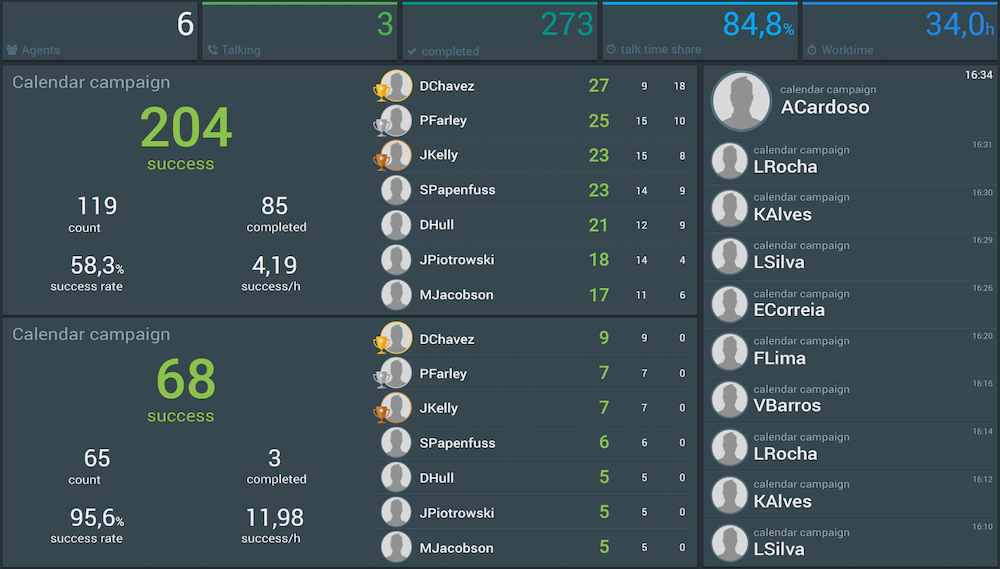
Dialfire, telephony solution - Wallboard Example
Wallboard Example

Reason #5: It lets you outsource your calling tasks easily and in full security

Dialfire offers you numerous options for outsourcing calling tasks in whole or in part be it to individuals or to external service providers, such as call centers. Especially in situations where the lead quality needs to be assessed first, this will really free your key sales personnel for the conversations with a lot of potential.

Worried about others stealing your leads? Rest assured, they will only see the data you share with them and only of the contacts they are speaking to. Also, all conversations can be automatically recorded. If a prospect shows interest, let your helping calling staff transfer the call back to your key sales personnel or schedule a follow up call or meeting.

Despite outsourcing, you retain full control and overview of all calls and activities. With the help of real-time analytics, call monitoring and recording, you can continuously monitor the quality and efficiency of external service providers and intervene if necessary.

Whichever option you choose. You are always the master of your data. Data privacy remains guaranteed. Dialfire has security features and protocols in place to ensure that data, even when used by external partners, is protected and secure.

Reason #6: It offers the advantages of a cloud-native SaaS solution - scalability, robustness, remote working

Just as with your noCRM solution, you would want to opt for a SaaS which is available immediately and where you do not need to worry about installations or software maintenance. Another plus is its support for today’s remote working and hybrid working models. This being said, you can restrict access to an office if needed.

As Dialfire is not only hosted in the cloud but is actually cloud-native, it fully scales with your needs in real-time and is very robust.

Reason #7: It integrates with the tools of your choice

Integration capabilities into your existing infrastructure are key. Similarly, as Dialfire integrates seamlessly by connector to noCRM, it also integrates with other external systems. You can check the full list here: http://connect.dialfire.com. In addition to the connectors, any system can exchange data with Dialfire through webhooks and API.

Reason #8: It ensures compliance

Different countries have come up with different regulations for automatic dialing, this is why a dialer should support the legal framework of your call destination and yet offer the best possible performance. Dialfire strikes this balance and offers different predictive dialing modes such as Fixed target abandon rate based on live connections, the mode of choice when calling the United Kingdom, USA, Canada, Australia or New Zealand, or Fixed target abandon rate based on dial attempts, which is the recommended choice for Germany.

Further, you can configure the legally allowed calling times as well as any call limitations relevant to your market. Do Not Call lists can be managed in Dialfire and even entire areas can be blocked for calling.

As for the security of your data, you will certainly have heard about the General Data Protection Regulation (GDPR). Dialfire is GDPR-compliant with user data being stored in European servers.

Reason #9: Unbeatable time to market

With the installation of the Dialfire noCRM connector, your calling campaign is created automatically. After that, simply configure your phone number, add your calling staff and you are ready to go. Of course, if you like to change the layout of the campaign or customize the workflow, you can do so with just a few mouse clicks.

Reason #10: Only pay for what you really use

Are you only running punctual phone campaigns? Do you have a fluctuating number of leads and/ or calling staff? Dialfire feels its users should only pay for what they really use and offers a fair and scalable pricing structure without monthly seat prices or minimum terms. This gives you peace of mind while testing a new solution. You are always free to leave.

Conclusion

The Dialfire noCRM connector is a useful extension to your noCRM if you are calling your prospects and leads within a campaign. It reduces wait time during calling, automatizes your workflow, and lets you reach more leads in less time, helping you increase your sales targets. It further integrates with your existing infrastructure and offers full insights into your campaign. Without setup and monthly fixed costs or any commitments, you cannot go wrong.

How to get started?

Simply install the connector by following the instructions here: https://www.dialfire.com/support/en/docu/nocrm-app and if you like, schedule a free demo call with the Dialfire team at https://dialfire.appointlet.com for an even quicker start.

Good and reassuring to know: Dialfire’s support is ranked highly on various software sites and feedback portals, so you will not have to walk on this path alone!


All your tools, working as one

Sales Tools & Automation
Titiana
July 22, 2026

noCRM vs Less Annoying CRM: Which Is Better for Small Sales Teams?

Compare noCRM and Less Annoying CRM to discover which sales solution best fits your business, whether you prioritize lead conversion or contact management.

Sales Tools & Automation
Titiana
March 24, 2026

How to boost your telemarketing campaigns

Want to accelerate your sales and uncover new opportunities? Telemarketing is your best ally. But let’s be honest, no one wants to deal with complicated tools and endless forms.

Sales Tools & Automation
Titiana
March 17, 2026

Best Lead Management Tools for Telesales

Discover essential lead management tools for telesales success. Boost your efficiency and close more deals.

Sales Tools & Automation
Titiana
February 17, 2026

noCRM vs Salesforce: Which CRM Platform is Right for Your Sales Team?

Compare nocrm and Salesforce in 2026 to find the right CRM solution for your business needs. Explore features, pricing, and suitability.

Sales Tools & Automation
Titiana
March 3, 2026

Slack Integrated Sales Tools: Complete Guide to Streamlining Your Sales Process

Discover how Slack integrated sales tools can enhance your team's performance and streamline communication.

Sales Tools & Automation
Titiana
February 24, 2026

noCRM vs HubSpot: Which Sales Tool Actually Fits the Way You Work?

Compare noCRM and HubSpot CRM to find the best fit for your business needs. Explore features, pros, and cons, and make an informed decision.

Sales Tools & Automation
Titiana
March 10, 2026

noCRM vs Monday CRM: Which Sales Platform is Right for Your Business?

Compare noCRM and Monday CRM to find the best fit for your business needs. Explore features, pros, and cons to make an informed decision.

Sales Tools & Automation
Titiana
February 10, 2026

noCRM vs Freshsales: Which CRM is Right for Your Sales Team?

Compare noCRM and Freshsales to find the best fit for your business needs. Explore features, pros, and cons to make an informed decision.

Sales Tools & Automation
Titiana
February 3, 2026

noCRM vs Zoho CRM: Which CRM Solution is Right for Your Sales Team?

Compare noCRM and Zoho CRM to find the best fit for your business. Evaluate features, pricing, and usability to make an informed decision.

Sales Tools & Automation
Titiana
January 27, 2026

noCRM vs Pipedrive: Which CRM Approach is Right for Your Sales Team?

Compare noCRM and Pipedrive to find the best CRM solution for your business. Discover key features, pros & cons to make an informed choice.

Sales Tools & Automation
Titiana
October 15, 2025

CRM for Telemarketing: How noCRM Accelerates Your Calling Campaigns

Traditional CRMs slow down telemarketing. Discover the alternative: noCRM, integrated VoIP, call scripts, prospecting lists, and much more.

Sales Tools & Automation
Grégoire
June 24, 2025

CRM Excel: Should You Switch to Lead Management Software?

Is Excel specialized enough to manage your leads? We look at why lead management software is a perfect replacement for CRM Excel.

Prospecting
Sales Tools & Automation
Titiana
June 24, 2025

Ultimate Guide to WhatsApp for Business & Sales

Discover how WhatsApp Business boosts sales, automates communication, and integrates with CRMs like noCRM for seamless lead management and customer engagement.

Sales Tools & Automation
Titiana
June 24, 2025

CRM vs Lead Management Software: Which One Should I Choose?

CRM vs lead management software isn't quite Batman v Superman levels, but it's close. Which one should you choose to support your sales team?

Sales Tools & Automation
Prospecting
Titiana
June 10, 2025

Top 10 Cloud VoIP Solutions

Looking for the best cloud VoIP solutions to enhance your business communication? We unravel key features, pros and cons, and pricing details of our top 10 tools.

Sales Tools & Automation
Titiana
March 25, 2025

Effortless Sales for Solopreneurs: Manage Leads, Send Quotes, and Close Deals with Ease

Discover how noCRM helps solopreneurs manage leads, send quotes, and close deals effortlessly—without the complexity of traditional CRMs.

Sales Tools & Automation
Titiana
January 7, 2025

Building Relationships with Leads Through WhatsApp: Tips for Salespeople

Tips for salespeople on using WhatsApp effectively to build relationships with leads.

Sales Tools & Automation
Titiana
November 20, 2024

Easily Create Stunning Professional Quotes, Invoices, and Now Deposit & Credit Notes from your CRM

Simplify invoicing with noCRM’s CRM with invoicing feature. Manage quotes, sales invoices, deposits, and credit notes seamlessly, all from one platform.

Sales Tools & Automation
Titiana
December 17, 2024

How to Manage Sales Leads Directly from WhatsApp: Introducing noCRM’s New WhatsApp Chrome Extension

Boost sales with noCRM’s WhatsApp Chrome extension. Easily create leads, log chats, and manage follow-ups without switching tools.

Sales Tools & Automation
Titiana
October 1, 2024

Our Guide to Choosing a Sales Management Software: Essential Features

Discover top sales management software features to streamline workflows, track leads effectively, and grow your revenue.

Prospecting
Sales Tools & Automation
Titiana
November 5, 2024

How to Be a Good Telemarketer: 9 Effective Tips

Discover 9 key tips to enhance your telemarketing skills, boost sales, and build lasting customer relationships.

Sales Tools & Automation
Prospecting
Titiana
November 12, 2024

How to Draft Efficient Meeting Request Emails: A Comprehensive Guide

Learn how to draft effective meeting request emails that engage recipients and secure appointments with our comprehensive guide and practical tips.

Sales Tools & Automation
Titiana
September 24, 2024

4 Tools and 8 Steps for Effective LinkedIn Prospecting

Master LinkedIn prospecting with our guide featuring 4 essential tools and 8 actionable steps. Enhance your outreach and boost sales success.

Sales Tools & Automation
Titiana
August 20, 2024

Email Automation: Building a Sales Machine by Integrating Your CRM

Transform your sales process with email automation and CRM integration. Discover how to streamline outreach, boost productivity, and drive growth effortlessly.

Sales Tools & Automation
Mariana
July 17, 2024

July updates from noCRM: integrations, strategies and tools to boost your sales

Discover new integrations, strategies, and tools to boost your sales effectiveness this month.

Sales Tools & Automation
Titiana
September 9, 2024

Boost Your Sales Game with the New noCRM and KrispCall Integration

Boost productivity by integrating noCRM.io with KrispCall for seamless communication, contact sync, call logging, and actionable analytics.

Sales Tools & Automation
Titiana
August 27, 2024

Calculate Your NPS Score Effortlessly with Your CRM and Typeform

Learn how to calculate your NPS Score by integrating your CRM with Typeform. Enhance customer satisfaction and drive business growth.

Sales Tools & Automation
Titiana
June 6, 2024

The Best Mobile CRM App for Android

Discover the best mobile CRM app for Android. Manage leads, update pipelines, and enhance sales productivity with the noCRM app, anytime, anywhere.

Sales Tools & Automation
Titiana
June 25, 2024

Maximize Team Collaboration with the new Slack and noCRM Integration

Discover how the Slack and noCRM integration enhances sales workflow with automated notifications, improved communication, and seamless collaboration.

News
Sales Tools & Automation
Titiana
May 21, 2024

Craft & Send Professional Quotes and Invoices Seamlessly with noCRM

Transform your sales process with noCRM: craft, customize, and send quotes and invoices effortlessly from your sales CRM.

Sales Tools & Automation
Titiana
May 2, 2024

Enhancing Sales & Prospecting: Why is noCRM the best Sales CRM for VoIP

Unlock sales efficiency with noCRM's VoIP integration. Streamline communication, automate workflows, and gain valuable insights for enhanced prospecting and revenue growth.

Sales Tools & Automation
Titiana
April 2, 2024

Solopreneur Tools: Essential Digital Solutions for Solo Business Owners

Discover the best digital solutions for solopreneurs. Explore key tools for project management, note-taking, accounting, and more to enhance your solo business.

Sales Tools & Automation
Titiana
March 5, 2024

Sales Email Template & Guide

Discover essential strategies for crafting compelling sales emails. Learn how to engage and convert your audience with our practical guide and ready-to-use templates.

Sales Tools & Automation
Titiana
February 20, 2024

Sales Trackers: What They Are, Why You Need Them, and How to Get Started

What are sales trackers, what are their advantages and how to get started? Read on to learn how to increase productivity and revenue growth.

Sales Tools & Automation
Titiana
February 6, 2024

The Advantages and Disadvantages of VOIP Software for Sales Teams

VOIP software facilitates communication processes for salespeople. In this article, we share their best advantages and disadvantages.

Sales Tools & Automation
Titiana
January 9, 2024

Introduction to Cold Email Copywriting & Templates

Dive into this article to discover how to build an effective cold email that stands out, with actionable tips and templates to get you started.

Sales Tools & Automation
Titiana
December 5, 2023

10 reasons why you should be using a tool for phone campaigns

Discover how integrating a telephony solution such as Dialfire with noCRM can improve the efficiency and conversion rates of your phone campaigns.

Sales Tools & Automation
Titiana
July 25, 2023

Follow-up effectively on WhatsApp with pre-filled messages

Discover how to leverage WhatsApp's for sales with pre-filled message templates to streamline your sales process and boost customer satisfaction.

News
Sales Tools & Automation
Titiana
July 4, 2023

Quickly perform lead actions across your platforms with noCRM

Save precious time by setting up the sales actions you’d like to perform through your different tools from noCRM.

Sales Tools & Automation
Mariana
May 9, 2023

What is the Best CRM for a Small Business?

Excel sheets only last so long. Once your business starts to grow, you need to select a software to manage your leads. But what is the best CRM for a small business?

Sales Tools & Automation
Mariana
May 9, 2023

5 Key Features of the Best Sales Team Management Software

We explore what makes the best sales team management software and how it helps to move leads through the pipeline and have a smoother sales process.

Sales Tools & Automation
Mariana
May 9, 2023

What Makes the Best CRM for Sales Reps?

Many aspects that go into the makeup of a CRM, but is the software proficient for sales people? We look at what makes a good sales CRM for sales reps.

Sales Tools & Automation
Mariana
May 9, 2023

6 Tips to Find the Best Lead Management Software

6 tips to help your company find the best lead management software and close deals faster.

Sales Tools & Automation
Sunny
May 9, 2023

5 Reasons for Low CRM Adoption in Your Sales Team

Many businesses struggle with low CRM adoption in their sales teams. Read on for 5 reasons why CRMs fail when it comes to sales.

Sales Tools & Automation
Mariana
May 3, 2023

How to do LinkedIn Prospecting the Right Way

Learn how to do LinkedIn prospecting the right way and generate more high-quality leads for your pipeline with these handy tips.

Sales Tools & Automation
Sunny
May 3, 2023

It's Time to End the Sales Tracking Spreadsheet

Discover why traditional spreadsheets hinder sales growth and explore alternatives to streamline your sales process and boost productivity.

Sales Tools & Automation
Sunny
March 2, 2021

How to Use a Prospect Management Plan to Improve Sales Prospecting Strategies

Sales Tools & Automation
Sunny
January 11, 2018

Lead Management System vs CRM: What's the Difference?

Lead Management System vs CRM: what's the difference? We're here to show you how they differ and why you probably don't need a CRM

Sales Tools & Automation
Mariana
October 25, 2016

Prospecting with Excel: Replace Your Spreadsheets

Many new businesses do their prospecting with Excel sheets to manage leads. But the time comes where a sales tool is is the better options.

Built for people who actually sell

noCRM is the action-driven sales tool built to cut admin and close more deals.

No credit card required
Set up your pipeline in minutes
Start managing leads instantly